How To: PAIRS Is the Easy Way to Restore Wi-Fi & Bluetooth Connections After Wiping Your Phone

How To: PAIRS Is the Easy Way to Restore Wi-Fi & Bluetooth Connections After Wiping Your Phone
If you enjoy modding your Android device with root utilities, custom ROMs, and Xposed modules, then there's a good chance you've had to factory reset your phone when something went awry. Plus, when you're switching ROMs, it's always recommended that you wipe all data, so us modders spend a lot of time restoring and tweaking various settings.Two of the most time-consuming settings that always need to be restored are your Bluetooth pairings, and your Wi-Fi configurations. Knowing this, developer hinxnz created a simple root app that will let you back up and restore all of these connections in a snap, and it even restores your Wi-Fi hotspot data. With this one installed, it will only take seconds to completely replicate all of your old connectivity settings, so I'll show you how to set it up below.
Requirementsrooted Android device "Unknown sources" enabled

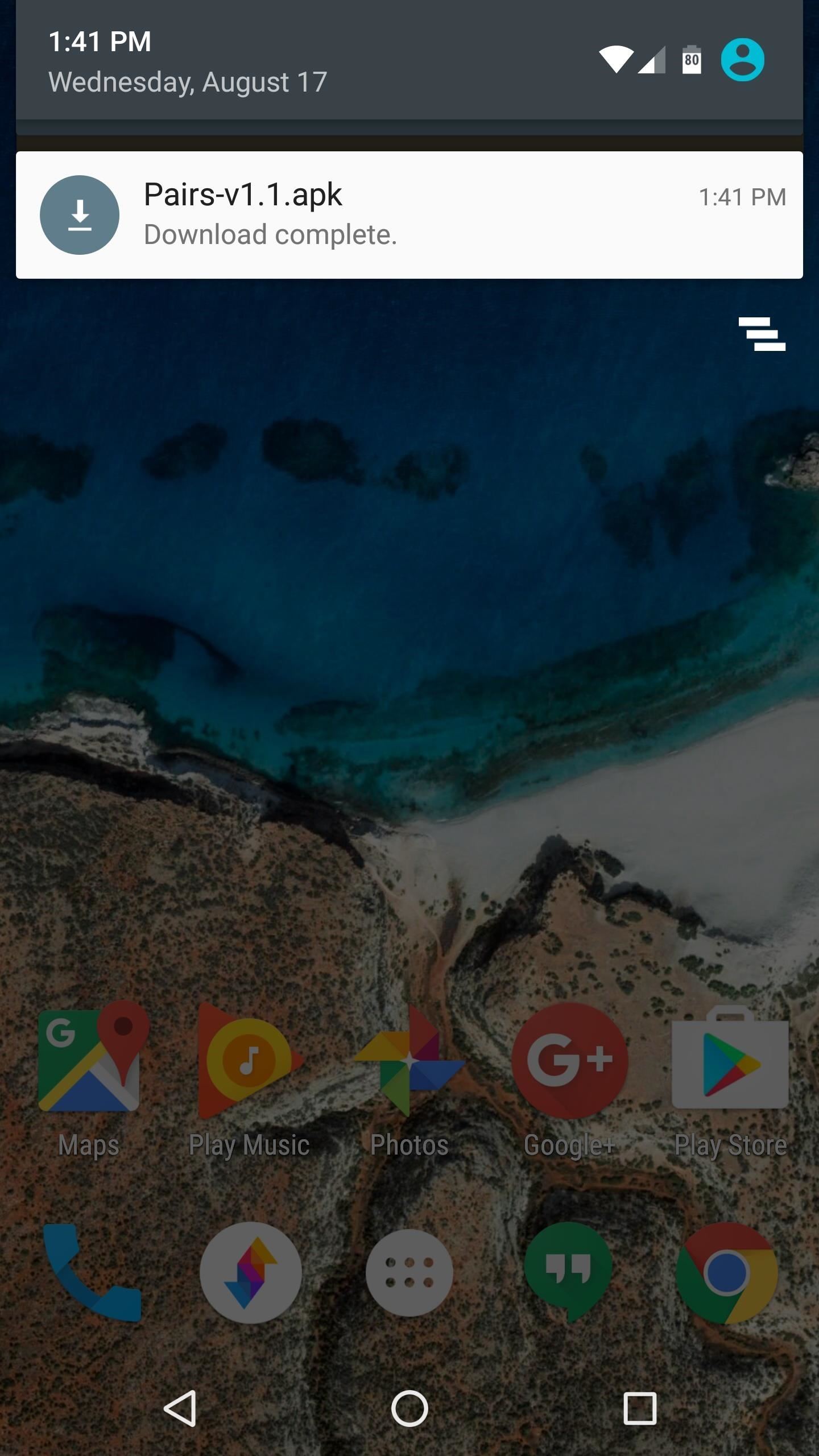
Step 1: Install PAIRSThis connection-restoring app is called PAIRS, and it's only available as an APK. So to start, grab the installer file from the link below, tap the Download complete notification, and press "Install" when prompted.Download the PAIRS app (.apk)

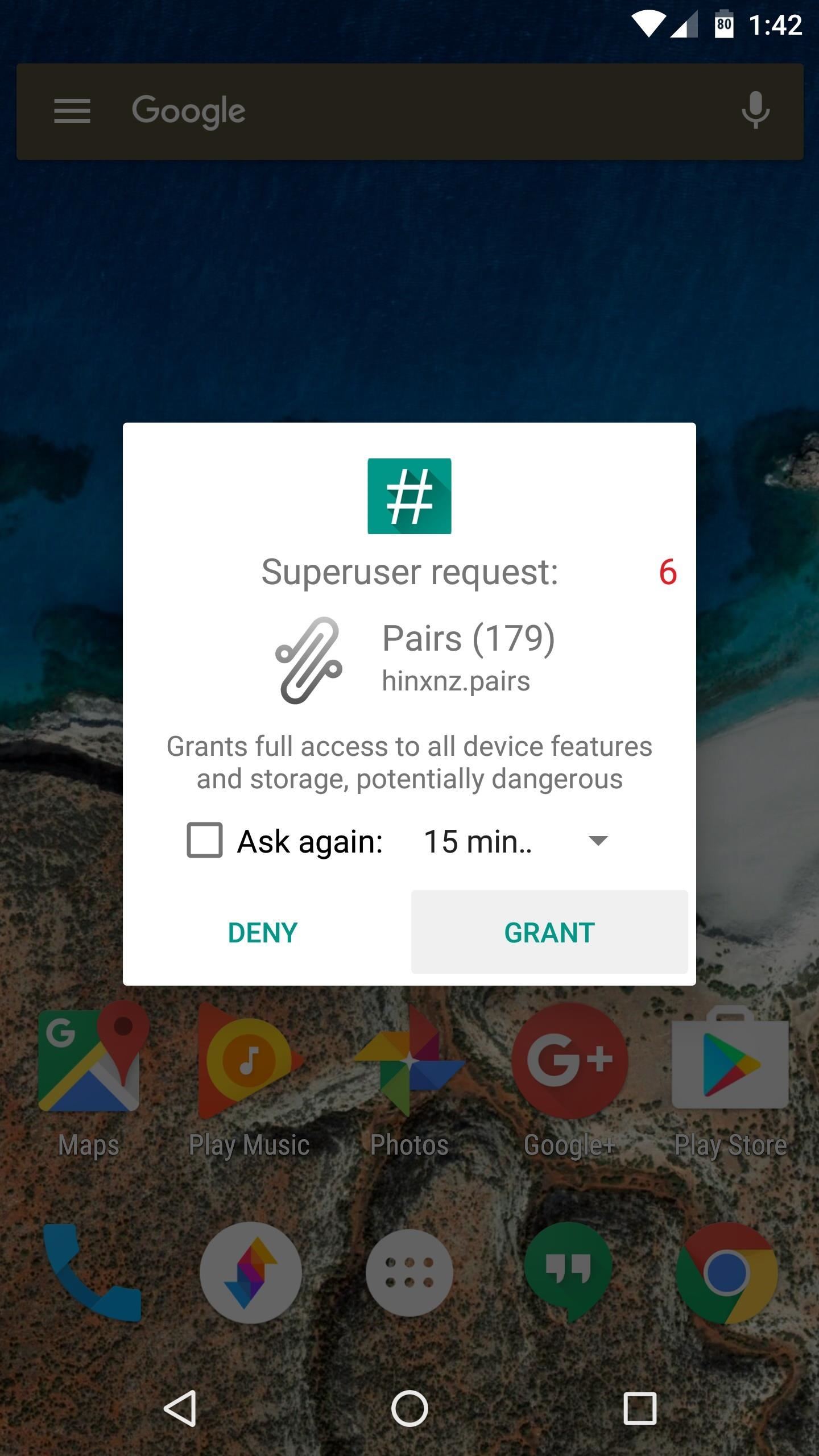
Step 2: Back Up Connection SettingsWhen you first launch PAIRS, the app will ask for Superuser access, so tap "Grant" on the popup. From here, just tap the "Backup" button beneath the Bluetooth Pairings or Wi-Fi Connections headers, then a file that contains an exact copy of all your current pairings and configuration settings will be created. If you're looking for the Wi-Fi hotspot feature, you'll find it in the three-dot overflow menu under "More," and it works just the same.

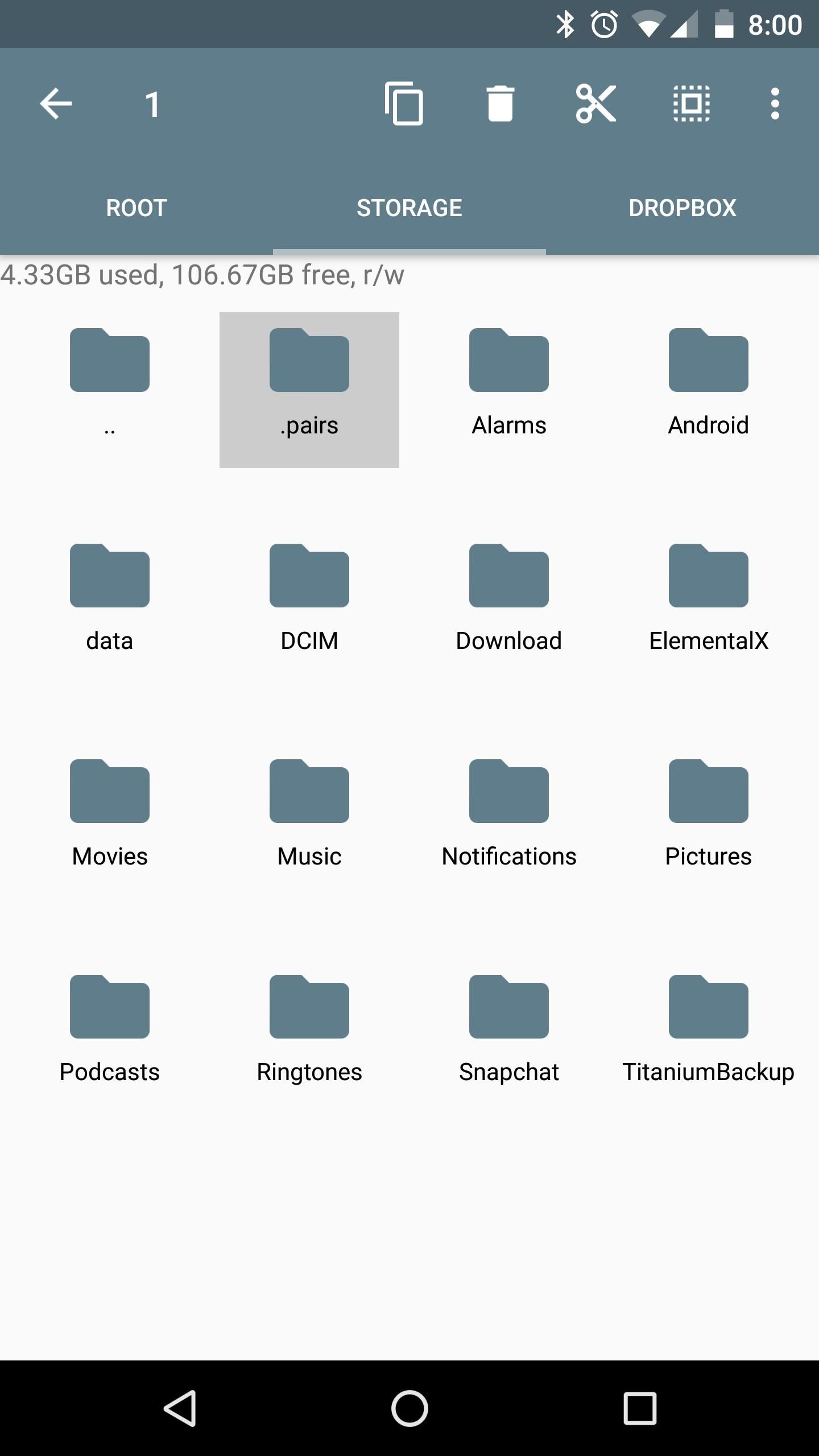
Step 3: Save Your Backup FilesThe backup files will be stored in a folder named .pairs on your SD card or internal storage partition, but because this folder has a period at the front end of its name, it may be hidden, depending on your file browser's view settings. So make sure to enable hidden folders in your favorite file explorer app so that you can see it.Don't Miss: The 5 Best Free File Explorers for AndroidNext, just transfer this entire folder to your computer for safekeeping, or upload it to a cloud storage service, and from now on, you won't have to worry about losing your connection settings again.

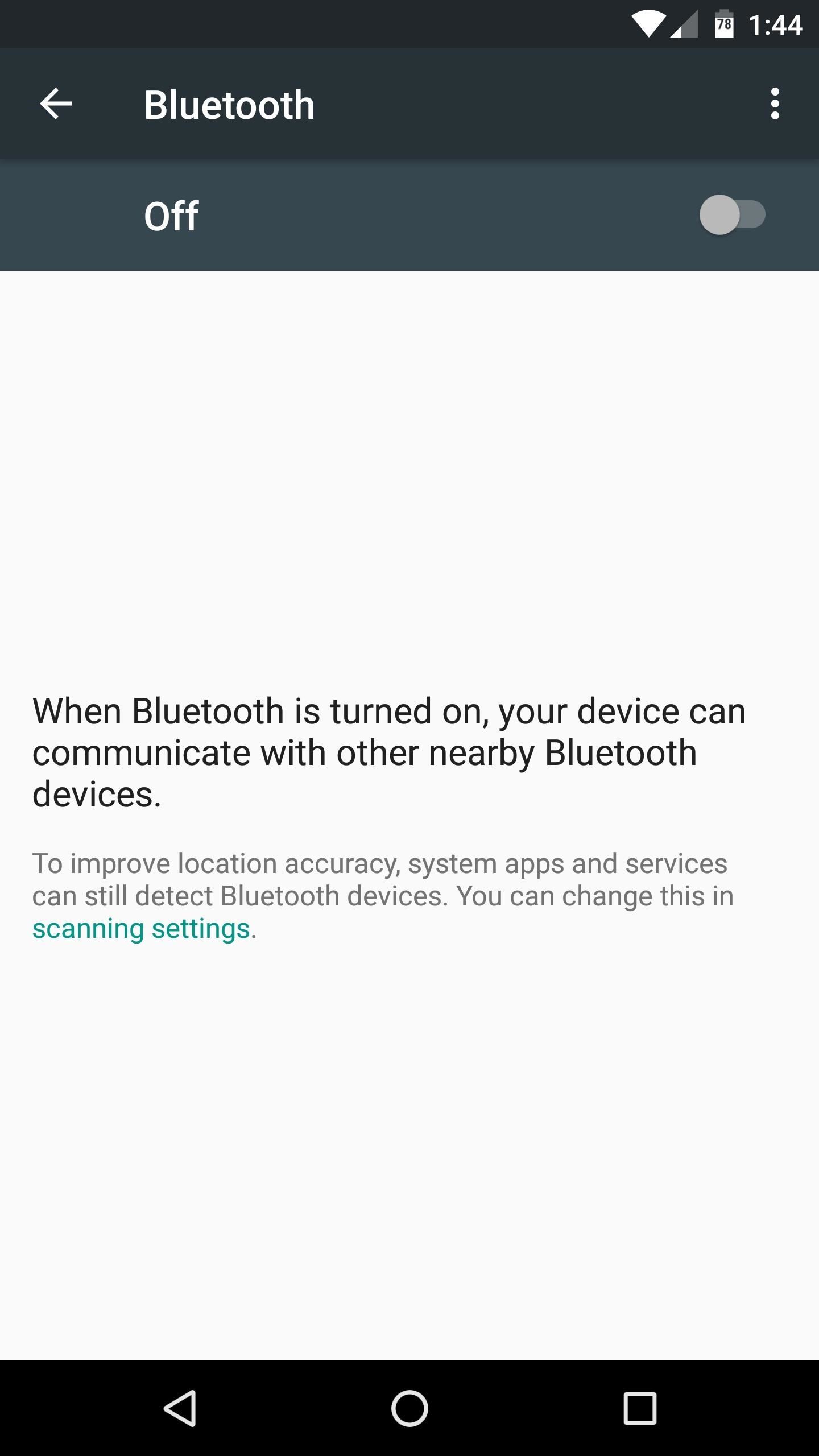
Step 4: Restore Your BackupThe next time you wipe your device, just install PAIRS again when you get back up, then copy that .pairs folder back to your SD card or internal storage partition.Other than that, make sure Wi-Fi and/or Bluetooth are turned off, then open PAIRS and tap the "Restore" button. When you turn Wi-Fi or Bluetooth back on, your pairings and connection settings will be there waiting for you, exactly the same as they were when you backed them up. It should be noted that, while it's theoretically possible, you probably shouldn't use PAIRS to transfer Wi-Fi or Bluetooth connection settings from one device to another, or from one Android version to a newer one. Because of slight differences between devices and Android versions, the settings configurations might not match perfectly, and this could cause problems.But it's a great tool for speeding up the process of switching ROMs, and it's good to have peace of mind knowing that you won't have to futz with Bluetooth pairing or advanced Wi-Fi settings the next time you reset your device.Follow Gadget Hacks on Facebook, Twitter, Google+, and YouTube Follow Android Hacks on Facebook, Twitter, and Pinterest Follow WonderHowTo on Facebook, Twitter, Pinterest, and Google+
Cover photo and screenshots by Dallas Thomas/Gadget Hacks


Simple Tips on How to Install Android 5.0 L Lollipop Messenger in KitKat Android Lollipop already ready to go, but the certainty for the future to your Android is unclear. Especially if your android is not Nexus. From some of the new things that showcased by google for lollipop, there is one interesting, that is Lollipop messenger who will
Install Google's new Lollipop Messenger app now! | AndroidPIT


We've described easy ways to free up space on your iPhone or iPad but that may not be enough for those who store a lot of data on their iOS devices. It's why we recommend that you pay a little
How to Free Up Space on iPhone (& Never Worry About - YouTube


Because I compared some Spotify songs with songs I own that I have tagged with ReplayGain tags and 89.0 dB target volume. These pretty much have the same volume as their Spotify counterparts with Spotify normalization enabled. But I think my local MP3s sound a little better than the 320 kBit Spotify streams, in general.
Why Spotify's 'set the same volume level for all tracks
productionadvice.co.uk/spotify-same-volume-setting/
For casual "shuffle" listening, you can enable Spotify's 'set the same volume level for all tracks' option - and put up with some pretty crass limiting on more dynamic material, unfortunately. If you want to listen to a whole album with the internal dynamics intact and no extra limiting, you can disable it.
Spotify Lowers Normalization Level - meterplugs.com


Netflix updated its Xbox One app, bringing a new interface users hate and cutting many features, such as voice navigation options, all gesture controls and the "continue watching" section.
Hacking NetFlix


How to download audio from youtube to your iphone How to download mp3 songs and videos on iphone without using pc (no jailbreak required iPad, iPod, etc) - Duration: 8:59.
How to Rip audio & video from YouTube to an iPod or PC


Install Safestrap Recovery & Custom ROMs on Your Bootloader-Locked Samsung Galaxy S4 [How-To]
How to Flash a Custom Recovery on the Samsung Galaxy Note 3


I don't know about you, but when I shoot a slow-mo video on my iPhone, I'd also like to have a regular speed copy of it, just in case slow motion doesn't fit the video right. Traditionally, converting slow-motion video required manually speeding the video back up in editing apps such as iMovie, but it turns out that iOS has a secret way to do
How to Convert Slow Motion Video to Normal Video on iPhone/iPad


Learn how to use Siri using our comprehensive Siri Commands List and questions, updated for iOS 12, optimized for mobile Safari browsers. These cool and useful Siri Commands can be used on your iPhone X, iPhone 8, iPhone 7, iPhone 7 Plus iPhone 6s, iPhone 6s Plus, iPhone 6, iPhone 6 Plus, iPhone 5s, iPhone 5c, iPhone 5, iPhone 4s, iPad Air (and later), iPad Mini (and later), and the 5th
How to Use the Shortcuts App on Your iPhone in iOS 12 for


I morges udgav Google et nyt projekt, der var passende benævnt Google Art Project. Dette nye online-værktøj sætter over 1000 kunstværker lige ved hånden. Og vi taler ikke Google Image Search. Kunstprojektet giver ekstraordinære detaljer for nogle af verdens mest kendte malerier.
Google's Art Project Chrome Extension brings masterpieces


Super Mario Run is anticipated to dispatch in the Google Play Store in the coming weeks, after beforehand going live on iOS on December 15, and cybercriminals are attempting to profit by the energy produced by Nintendo's new title utilizing another influx of malware. introducing a honest to goodness amusement, the supposed Super Mario Run […]
How to Play Super Mario 64 Directly in Your Web Browser


Android Pie vs Android Oreo: app AI. Android 9 Pie is smarter than Android 8 Oreo. It predicts the features you'll want, and puts them in front of you before you go looking for them.
How to Stop Oreo Battery Draining and Extend Battery Life

Get Organized: How to Set Up Your Phone for International

How To: Turn a CD or DVD container into a holder for spare parts

How To: Turn a CD or DVD container into a holder for spare parts
Recycle your plastic CD or DVD cases into a holder for parts. This tutorial shows you how to make your own container. Remove the spindle, then mount to a piece of wood. Once mounted, you can use this to hold and organize small parts. Please enable JavaScript to watch this video.


When that's finished, go ahead and give it a whirl. Apps that formerly wouldn't work with split-screen mode should now work fine for the most part. It's worth keeping in mind that the results can still be buggy here—you are, after all, forcing an app do something it isn't supposed to do. Most of the time, however, it works quite well.


Converting MP3 to iPhone Ringtone is an uphill battle. iTunes makes you either buy your ringtone or convert it to specially designed M4R format with iTunes. Turns out there are many of us who love to change their iPhone ringtones from time to time. Whether short or long, a ringtone is like a visit card of your iPhone.
How to Add Ringtones to iPhone using iTunes [2019]


In this short post we are going to show you how you can enable Facebook notifications on Chrome - both on Android and on the desktop. You won't need to add extensions, unearth a hidden setting or use a third-party service,
How to Hide Notification Icons on the Windows Taskbar


Apr 01, 2019 · The latest iPhone and the newest version of Google's Android come with tools to limit how much time you stare at your screen. Here's how to make them useful instead of nags you'll eventually
How to Remove Gamers Unite from your Facebook Account


Yesterday, Bryan Clark pointed out a new option on Verizon's privacy settings that gives new customers 30 days to opt out of a data sharing program that gives advertisers information on basically everything you're doing on your new iPhone (or any other smartphone). The program includes location data
AT&T, Verizon, Sprint and T-Mobile reportedly sell your


Connect Instagram to Twitter to share posts you choose on both social networks. Posts won't automatically move from Instagram to Twitter without your per-post consent. Alternatively, use a third


How to Behave in Internet Chat Rooms. Cyberspace chat is a great way of connecting people with similar interests. It comes with its own etiquette, or "netiquette", which may confuse or even intimidate a novice.
How To Behave In Internet Chat Rooms - YouTube


You can use Apple Pay in grocery stores, boutiques, and restaurants — and for everything from vending machines to trains and taxis. It's also accepted in all kinds of apps and websites using Safari on your iPhone, iPad, and Mac. You can even use Apple Pay as an easy and secure way to make donations to your favorite nonprofit.
Apps and Stores that Accept Apple Pay - Updated List 2018


2) Under the Account Preferences section click Delete your account or services. 3) From here, you have two options: Delete products (such as Gmail, YouTube, etc.) or Delete Google Account & Data. Since this is a guide on how to delete everything from Google, we'll select Delete Google Account & Data. 4) Google will ask you to re-enter your
How to Delete Activity History of Your Google Account on Android


This video demonstrates how to install Webmin via SSH. Once you've downloaded the Webmin interface package, you'll want to install it onto your serve. In order to do that, you'll need to depackage it.
How a file or module can be upload in moodle using FTP


Lg Vn251s Cosmos 3, Verizon Wireless (Black) and struggled to send and receive text messages. It would run its battery down quickly hunting for signal. Messages
How to Transfer Text Messages from LG to Computer (Windows/Mac)


With your jailbreak back up and running, you now go about customizing your iPhone some more, knowing that if something goes wrong, you can just reboot your device and easily re-enable jailbreak with the tap of a button.
Jailbreak Your iPhone or iPod Touch with iOS 4 the Easy Way

How to Program a USB development board for cheap - Gadget Hacks

How To: Hide the Navigation & Status Bars on Your Galaxy S9 No Root Needed

How To: Hide the Navigation & Status Bars on Your Galaxy S9 No Root Needed

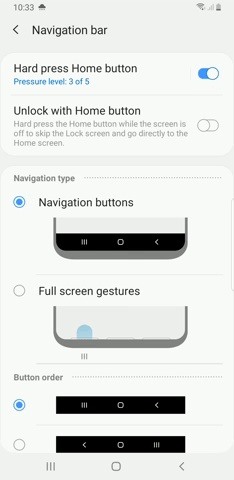
Putting your Galaxy S9 in Immersive Mode lets you truly enjoy the gorgeous display that Samsung is so famous for. You can't have it set on at all times, however, so you'll still have to deal with the status and navigation bars that cut the phone's aspect ratio down to that of a standard phone. But if you're willing to dig a little deeper, there are ways to go full Immersive Mode on your S9 for good.With One UI, Samsung has ditched the option of hiding the navigation bar on your S9 via a small circular button in favor of gesture-based navigation controls that get rid of the bar entirely. You're still left with the status bar to deal with, however, and while it's transparent when on the home screen, the status bar will often turn opaque depending on that app you're currently using. Thankfully, it's possible to hide your Galaxy S9's status bar and go full immersive using a method that's been out for a while. Though the process doesn't require root, you'll need to run an ADB command. Keep reading further if you want to get the most out of your S9's gorgeous display — just be sure to follow the steps exactly as they appear, especially if this is your first time with ADB and Fastboot.
RequirementsDeveloper options and USB debugging enabled Windows, Mac, or Linux computer ADB and Fastboot installed USB data cable

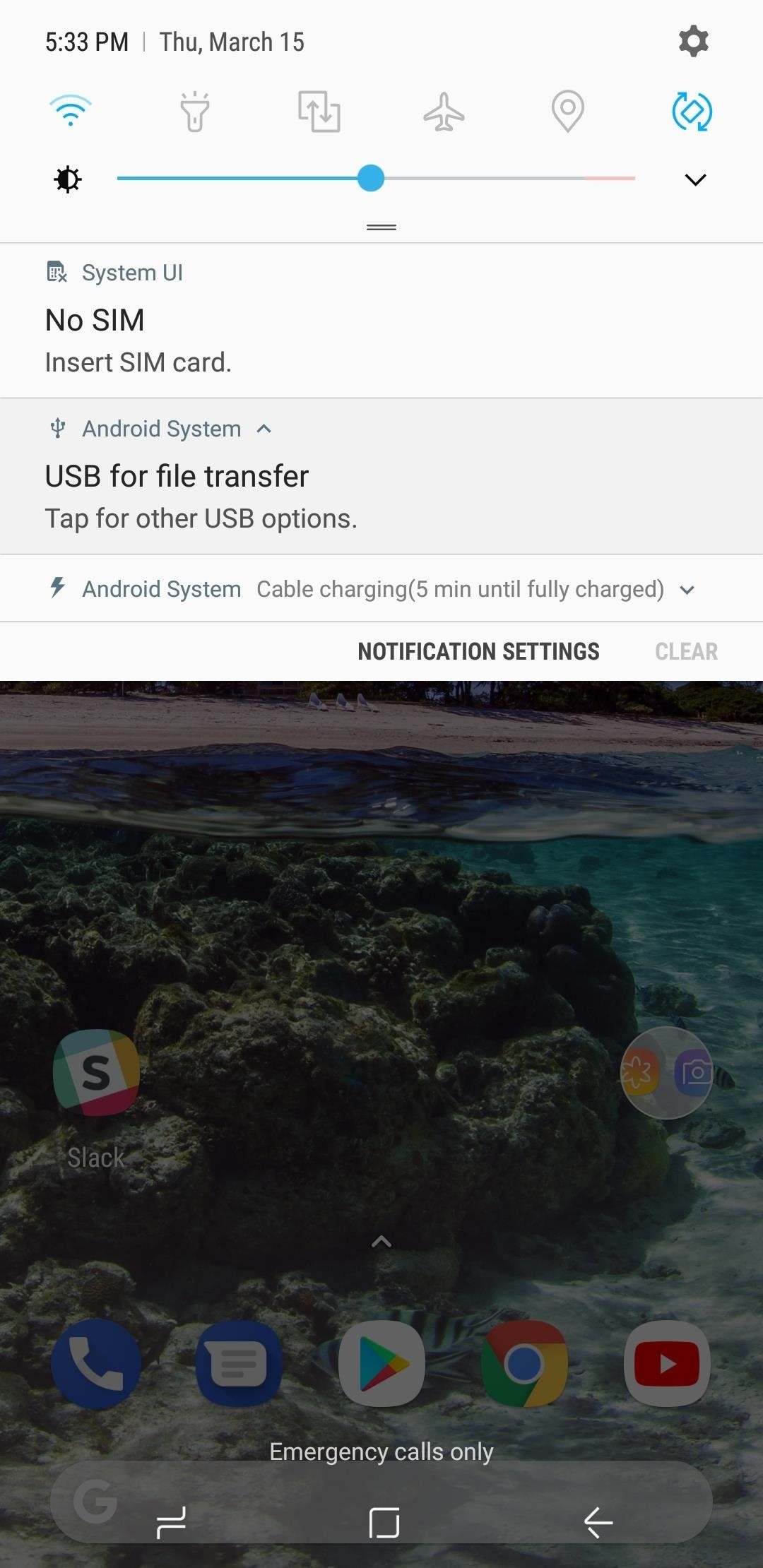
Step 1: Allow USB Computer ConnectionAfter installing ADB and turning on USB Debugging, connect your Galaxy S9 to your computer with a USB data cable. Next, swipe down from the top of your screen and select the "Android System" notification, then choose "Transfer files" from the popup.

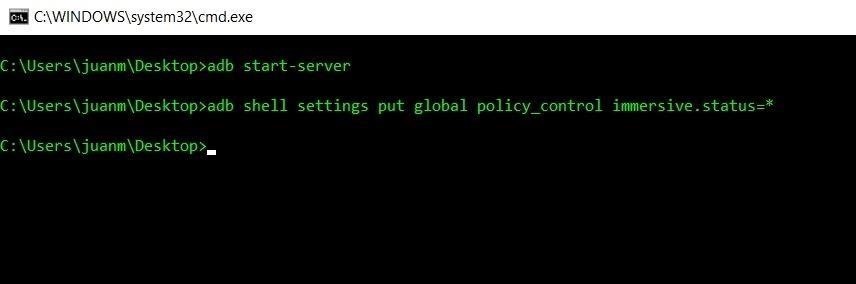
Step 2: Open ADBRunning an ADB command is necessary hide the S9's status bar to keep it on Immersive Mode at all times. Because of this, you'll need to open a Command Prompt or Terminal window in the platform-tools folder inside of your ADB installation directory.If you downloaded the SDK Tools from Google and did a default installation, go to the C:\Program Files (x86)\Android\android-sdk folder. If not, go to the folder where you installed ADB, then open the platform-tools folder located inside. Now, hold the shift button on your keyboard, then right-click within the window and choose "Open command window here."Don't Miss: Google Just Made It Easier to Flash Images & Sideload Updates on Your Android DeviceIf you have a Mac or Linux machine, open a Terminal window and change directories to the platform-tools folder. Perform a search on your hard drive for "platform-tools" if you don't know where it is, as the folder's exact location can vary depending on where you extracted ADB and Fastboot when the utilities were installed. Opening an ADB command window on Windows. If you need a more detailed walkthrough about the subject, head over to our full ADB and Fastboot guide to get to know this important modding process better.

Step 3: Input CommandsNow that a connection has been established with the S9 and ADB is up and running, you'll need to type in a single command to hide the status bar at the top of the screen, so enter the following:adb shell settings put global policy_control immersive.status=*

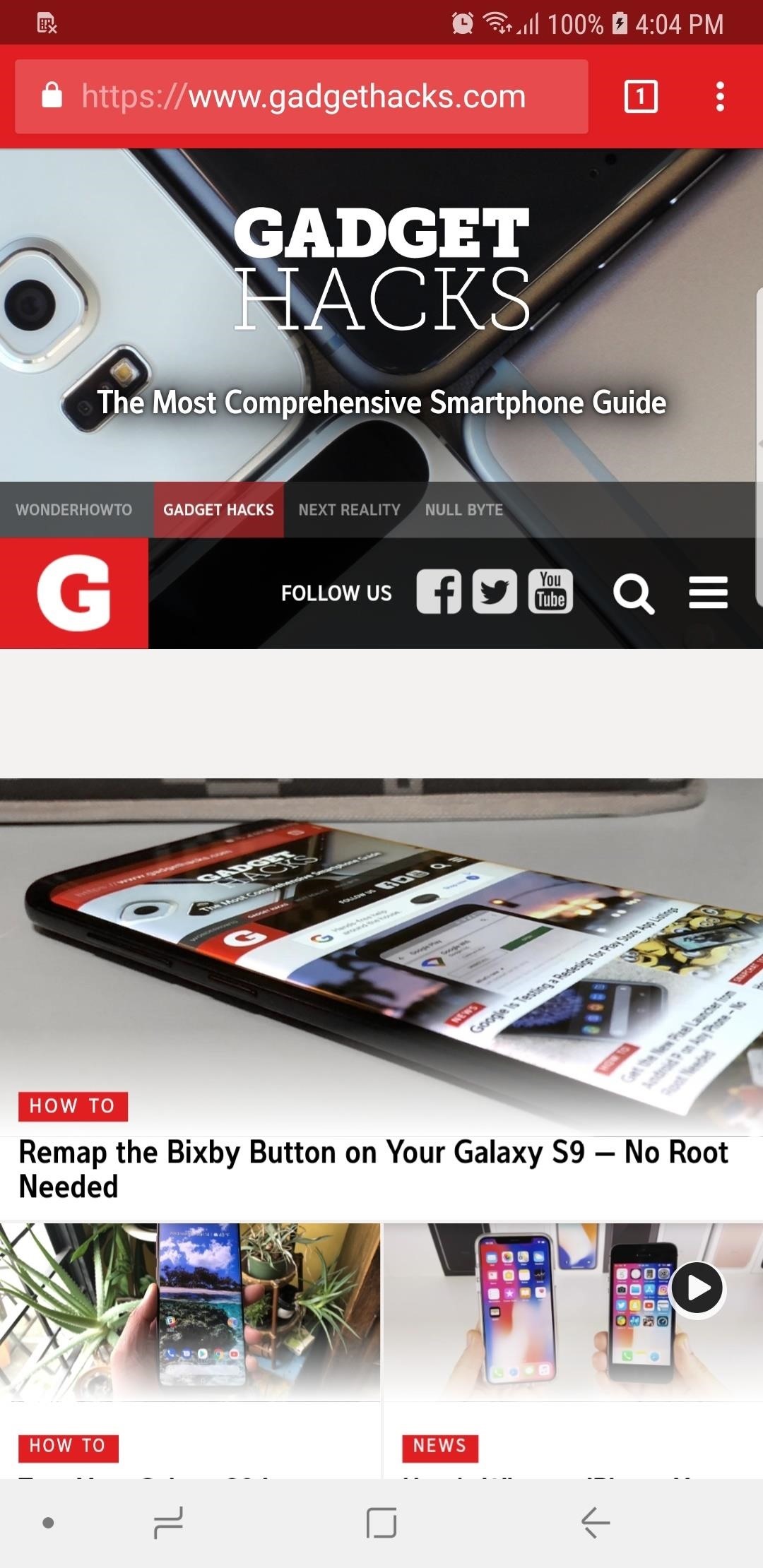
Step 4: Enjoy Full-Time Immersive ModeImmediately after sending the above command, your status and navigation bars will disappear. At this point, it would be a good idea to restart your phone so that any apps that were previously open can redraw themselves to accommodate the extra screen real estate. (1) Status & notification bars present, (2) Status bar disabled, (3) both status & notification bars disabled From now on, you'll still be able to access the navigation and status bars on your S9 by swiping in from either the top or bottom of the display, depending on which one you wish to access. The keyboard will still pop out as it normally does whenever you tap on a box that requires text input, and the home button's haptic feedback still remains active, but you'll need to reveal the navigation buttons to access Google Assistant.

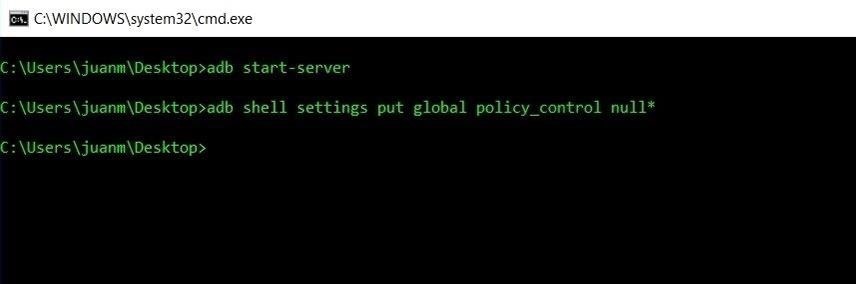
Reverting This ModIf you ever want to bring your S9 back to its stock configuration and re-enable the status bar, simply type in the following command to bring the display back to its original settings:adb shell settings put global policy_control null* Don't Miss: More Tips & Tricks to Get the Most Out of Your Galaxy S9Follow Gadget Hacks on Facebook, Twitter, YouTube, and Flipboard Follow WonderHowTo on Facebook, Twitter, Pinterest, and Flipboard
Cover image and screenshots by Amboy Manalo/Gadget Hacks


How To: Feeling Smart? Test Your IQ with Your Android Device How To: Disable the Photo Auto-Enhance Feature in Facebook's Mobile Apps How To: Repel Mosquitos, Dogs, & Annoying Friends with High-Frequency Tones on Android How To: Turn Any Device into a Spotify Remote or Speaker with Spotify Connect
How to Reset your Android box using Android Recovery Mode


First it was the car stash, then it was the glow stash and now it's the Amp. So, what is the Lyft Amp and how do you get one? Joe with The Rideshare Guy is going to discuss, demo and review the Lyft Amp. Take a look at Joe's video to see the Amp in action, and check out the transcript of the video below.
Peak Hours - Lyft Help


How To: Make Apps Use the Entire Screen on Your Essential Phone — Even the Notch How To: This Is How Android 9.0 Pie Will Handle Notches News: What Every Phone Gained by Adding a Notch News: The Real Reason Android Phones with Notches Have a Chin
What Every Phone Gained by Adding a Notch « Smartphones


Set and manage reminders on Google Home You can set, ask about, and delete time and location-based reminders on Google Home. Notifications will appear on Google Home and your phone at the time you set or when you reach your location.
Never Forget Your Grocery List Again — Make Google Home


How to Unlock a Samsung Galaxy. This wikiHow teaches you how to carrier-unlock your Samsung Galaxy smartphone. Carrier-unlocking your phone will allow you to use it on any carrier's network as opposed to just the carrier from whom you
Protect Individual Apps on Android That You Can Only Unlock


How To : Mark exact spots on a Firefox webpage with the Dog Ears extension If you're looking for a way to mark exactly where you left off reading on a web page, then this video is for you. With the help of Dog Ears for Firefox, you can mark exactly on any given web page where you stopped reading and want to pick up again.
wikiHow - How to do anything


Get the latest sports news, opinion, analysis, player rankings, scores, standings and videos for NFL, NBA, MLB, NCAA, NHL, Olympics and more msn back to msn home sports web search
How to Unlock the Hidden Weather Lock Screen Widget in iOS 12

Launch Apps & Custom Actions with Screen-Off Gestures on


If the Lens service fails to identify an image, it falls back on the power of Google's search engine to let you look it up yourself. Try Google Lens out with Google Lens Launcher for Google Photos
Google Lens app vs. Lens in Google Photos: Which is better


How to rearrange multiple apps using drag and drop. While most of the iOS drag and drop features remain iPad-only, this trick actually works on both iPhone and iPad. It allows you to rearrange apps on your Home screen using drag and drop, rather than having to move them one at a time.
iOS 12.3.1/iOS 12 : How to Use Drag and Drop on iPhone: Give


Thanks to Google's latest update to their Motion Still app, iPhone users can now pick a new frame for Live Photos. The app fixes everything annoying about Apple's Live Photos, and this is just another great feature to add to Motion Still's impressive features list.
The 7 Best New Features for Live Photos in iOS - iOS & iPhone


In this softModder tutorial, I'll be showing you how to set up your Samsung Galaxy S3 so that you always know what calls you have missed, even when your have forgotten your phone. All you need is
How to Forward Missed Call Alerts & Text Messages on Your

How To: Turn Your Nexus 4 or Nexus 5 into an LG G2 Clone

How To: Turn Your Nexus 4 or Nexus 5 into an LG G2 Clone

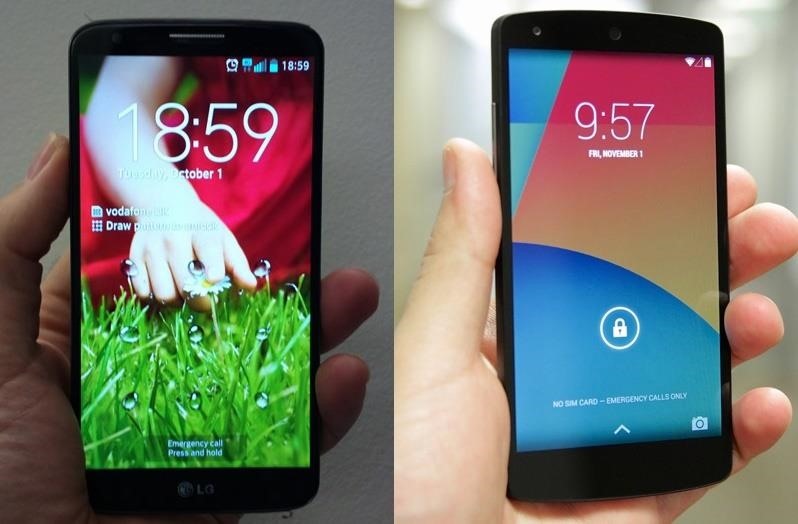
The advent of a new Nexus phone begins with the bigwigs at Google partnering with a manufacturer, then selecting that manufacturer's flagship as the model for the new Nexus hardware.Samsung's Galaxy S and Galaxy SII were the base for the Nexus S and Galaxy Nexus, respectively, but these days, the Nexus line has pivoted toward LG with the Optimus G and G2 serving as the hardware inspiration for the Nexus 4 and Nexus 5. Above: LG G2 and its "clone", the Nexus 5We recently showed you how to model your Nexus 4 after a Nexus 5, and even how to turn it into an iOS-like device. In our continued effort to keep your beloved Nexus 4 or Nexus 5 feeling fresh, here's how you can make your N4 feel like an LG G2, which has some swanky features, including a stellar lock screen and a more fully featured launcher. Let's dive in. Please enable JavaScript to watch this video.
Step 1: PrerequisitesRoot your Nexus. It's quick and easy. Enable "Unknown sources". Install TWRP Recovery.
Step 2: Download the G2 LauncherStock Android is certainly nice, but the manufacturers out there do some great things with their skins, and LG is no exception. The G2 launcher has a lot going for it—it's clean, fast, and pretty.Developer Jishnu Sur has a ported version of the LG G2 Launcher which you can download directly to your device (or transfer from your computer).

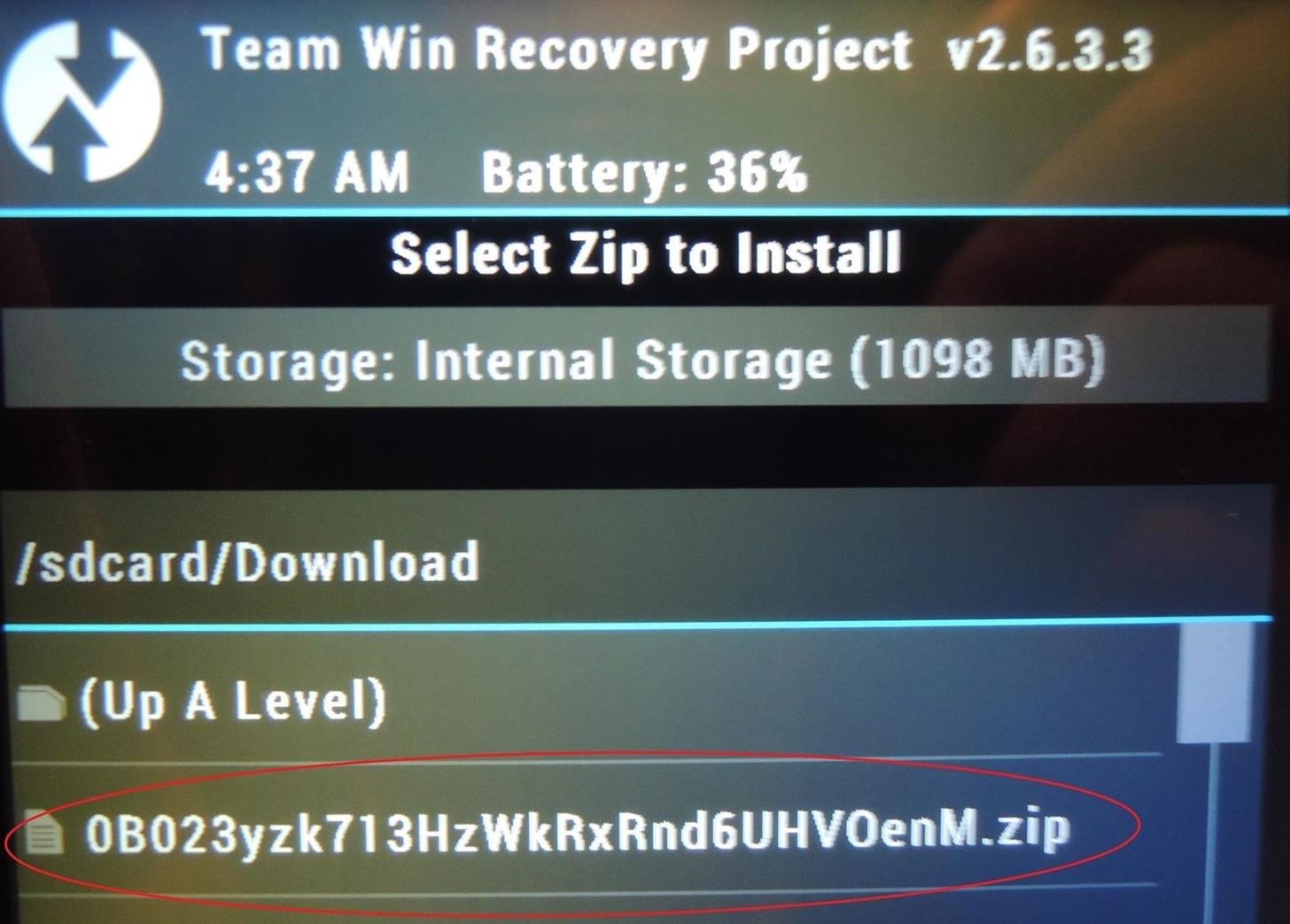
Step 3: Flash the G2 Launcher from RecoveryAfter you've downloaded the .zip file, reboot your phone into recovery by powering down the device, then turning it back on by holding in the Volume Down and Power keys at the same time until the Android on his back shows up. Then, use the Volume keys to navigate to "Recovery mode" and the Power key to make the selection.Once in recovery mode, tap Install, then navigate to the .zip file which should be located under Downloads. The zip file is a string of numbers and letters that begins with 0B023... Tap the file, then swipe the arrow to flash and install.

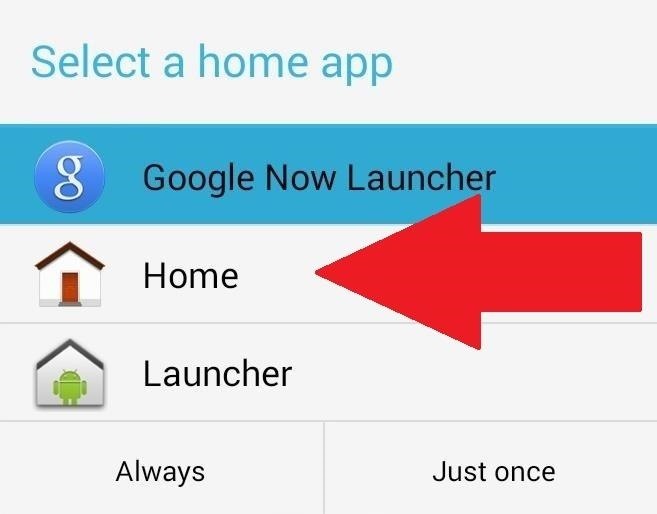
Step 4: Activate LauncherAfter a reboot, you'll be prompted with a dialogue box asking you which launcher to use. Select Home, then Always. If you ever want to go back to your previous launcher, simply go to Settings -> Home -> then select your launcher of choice. The G2 launcher should be similar to what you're used to, but with a few added changes. The home screen grid takes advantage of a larger screen, making it 5x6 (instead of the standard 4x5). Meanwhile, you can store up to eight apps in the dock as opposed to four, giving you double the quick access apps.You can also pinch to zoom to customize home screens by moving them around or adding and deleting screens. The app drawer is fully translucent, has different tabs for apps and widgets, and a 5x5 grid size. The drawer can be further customized by tapping the gear icon, allowing you to rearrange and remove apps and widgets from the drawer. Note: One of the dialog boxes that pops up includes instructions on how to use the G2's "Knock Knock" feature to double-tap on the screen to wake or put the device to sleep. Unfortunately, that's not going to work for us because we don't have the requisite support.

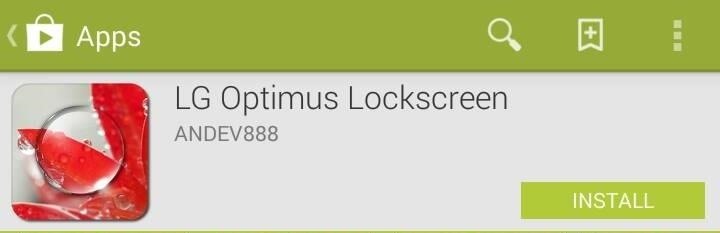
Step 5: Install the LG Optimus LockscreenThe real star of the show is the LG Optimus Lockscreen, developed by andev888 (also known as Aatif). If there's one thing that LG gets right, it's the lock screen—grab the app from Google Play for free. While the app will function even if you aren't rooted, the dev warns that it won't function as well. Without root, several of the unlock animations won't work that great or even at all, and trust me, you're going to want to use those.

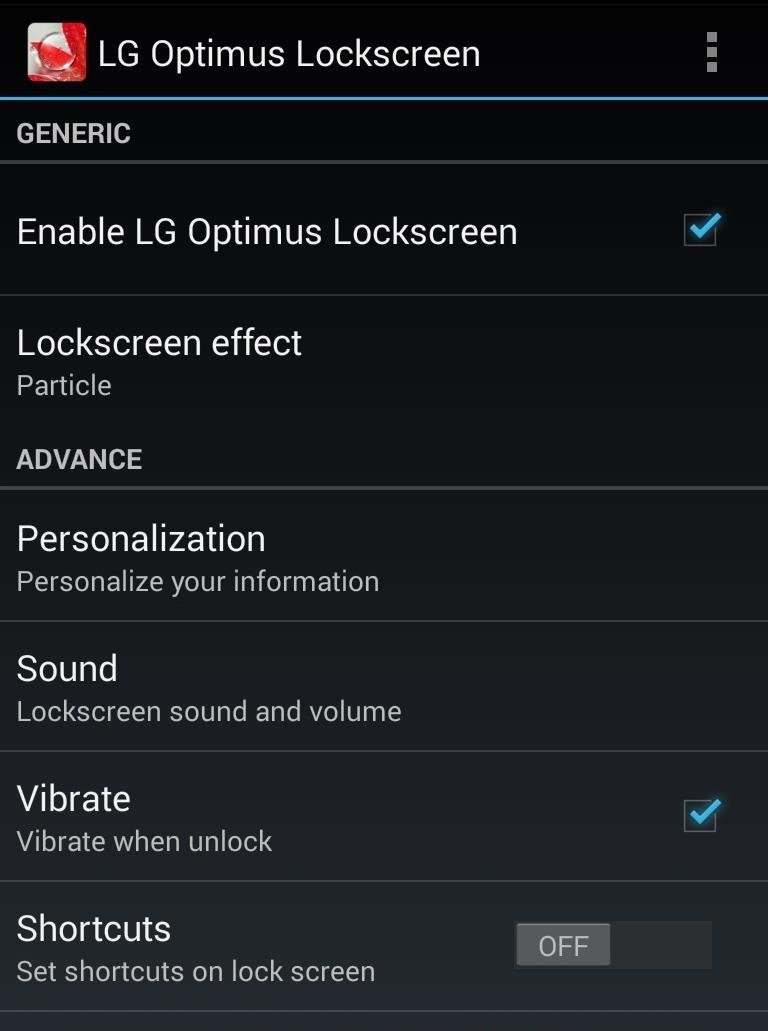
Step 6: Activate the LG Optimus LockscreenWhen you open the app, ensure Enable LG Optimus Lockscreen is checked. Once activated, there's a lot you can adjust—everything from shortcuts and date and time to background wallpapers and owner information. You can also toggle the status bar on and off. Security is alive and well under the More tab. You can choose between pattern or pin security and also disable the stock lock screen, which I would definitely recommend you do so that you don't end up with two lock screens. You can also select up to five different shortcuts for apps you want to launch directly from the lock screen—once selected in the Shortcuts tab, dragging on one of them in the lock screen will launch you into that app. I'm also happy to report that lock screen notifications are go for SMS messages and missed calls. Why stock Android doesn't do this is beyond me.

Lockscreen EffectsAnd now for the main event—the effects. You've got Particle, Crystal, DewDrop, Ripple, and Whitehole to choose from, and they're all awesome. The Crystal and DewDrop effects will require root to function properly.Swiping your finger anywhere on the lock screen will give you a preview of whatever's underneath, whether it's an app you were just in or a home screen. The effect of the preview will change depending on which effect you choose, and they all come with their own lock and unlock sounds (which you can change or turn off). The effects are superb and, dare I say, even kind of fun. They're a much trumpeted feature of the current crop of LG devices, and there is no reason for you not to have the whole shabang; lock screen included. Your Nexus 4 may be old, but what it lacks in youth it makes up for in adaptability. There's a lot you can do with the Nexus 4, including making it feel like the very device on which its newer sibling, the Nexus 5, was based. And if you have a Nexus 5, make it look like the device it was inspired from. Give it a go, and let us know what you think in the comments.Nexus 5 image via TechnoBuffalo, LG G2 image via Talkmob


Mini Matchstick Gun - The Clothespin Pocket Pistol Learn how to turn boring old clothespins into powerful matchstick & toothpick shooters, that will shoot angry bird and joke, and lob firey darts
Image Gallery matchstick gun - keywordsuggest.org
keywordsuggest.org/gallery/357015.html
How to Make a Clothespin Pocket Pistol (AKA Mini Matchstick Gun Using our free SEO "Keyword Suggest" keyword analyzer you can run the keyword analysis "matchstick gun" in detail. In this section you can find synonyms for the word "matchstick gun", similar queries, as well as a gallery of images showing the full picture of possible uses for
Mini Matchstick Gun - The Clothespin Pocket Pistol

Swipe Your Screen to Skip Songs & Change Volume Without Even


How To: Protect a touchscreen device against rain (cheaply) How To: Protect your blog by trademarking your domain name How To: Secure a new Microsoft Windows PC to protect it against malware How To: Protect your iPhone or iPod Touch from theft with the Cylay app
How to Seal and waterproof the belt - ATV :: WonderHowTo


Can't sign in to your Google Account; Recover your Google Account or Gmail; Tips to complete account recovery steps; Secure a hacked or compromised account; Recover a recently deleted Google Account; Delete your Google Account; Change or reset your password; Signing in with an Apple device
Change password - Google Account


Other Features of the Samsung Galaxy Note 8 Video Downloader - KeepVid Pro. Now that we have shown you how to download videos on Samsung Galaxy Note 8 take a look at the list below and see some of the other features that the Samsung Note 8 Video Downloader - KeepVid Pro includes. Download Multiple Videos at Once.
How to Download and Watch YouTube Video on Samsung Galaxy Tab?


Want to get even this Halloween? Want to scare somebody with nothing but a few lines of code? Here's how it can be done So, with arguably the best holiday quickly approaching us, I thought I'd do a fun post on a cool way to prank your friends, enemies, or maybe even the whole office (we'll get onto that in another tutorial).
Enfrente seus colegas de trabalho no Halloween: Windows


You can use an iPhone or iPad that's already running iOS 11 or later to automatically set up a new device. This process occupies both devices, so make sure that you choose a time when you won't need to use your current device for several minutes.


With the release of various new and updated Samsung Galaxy S6 apps and features, like Smart Switch, Smart Remote, and wallpapers, something that's a home screen staple for most Android users was still missing.
Galaxy S7 - Add the Weather and Clock Widget to Your Home


There's no such thing as a perfect Android keyboard. Some, like Swype, have gesture typing down to a science, but lack in predictive technology. SwiftKey, on the other hand, boasts awesome next-word prediction, but less than stellar gesture typing.
How to Automatically Change your Keyboard on a Per-App Basis


How to Use Drag and Drop in iOS 11 on iPhone Using Drag and Drop, you can move multiple apps or transfer files from one location to the other in Files app on your iPhone powered by iOS 11. Let me show you how it works the right way!
How to use Drag and Drop on iPad | iMore


How To: This Super Simple Mod Improves & Speeds Up Web Surfing on Your Samsung Galaxy S3 How To: Mod Your Samsung Galaxy Note 2 for Multi-Window View with Any App How To: Fix Titanium Backup & Substratum Problems Caused by the Latest Google Play Services Update How To: Root ANY Samsung Galaxy Note 3 Variant in Just One Easy Click


This is Official guide how to Jailbreak iPhone 4 on iOS 7.1.2 by Pangu Tool. After a long development period and testing now we can finally proudly confirm that the Pangu Jailbreak really works on iOS 7.1.2 for iPhone 4 as well as newer models. The release of the Pangu untethered jailbreak iOS 7.1.2
Jailbreak Iphone 3G/3GS and Unlock with Redsn0w 0.9.2

How to Turn Your Phone into a Lightsaber & Fight


How to Save Custom Shooting Presets in Filmic Pro So You Don't Have to Adjust Settings Later for Similar Shots. 03 Friday May 2019
How To: Save Custom Shooting Presets in Filmic Pro So You Don

Google Play Music 101: Finding & Adding New Music to Your Library

How To: Get Refunds for Mobiles Apps from Android, Apple and Amazon

How To: Get Refunds for Mobiles Apps from Android, Apple and Amazon

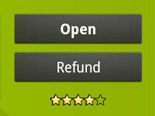
Nowadays, there's a mobile app for just about everything—but that doesn't mean it should be on your smartphone. Not diggin' what SPB Shell 3D did to your home screen? Accidentally purchased Angry Sperms instead of Angry Birds? Want to try out the upcoming Smuggle Truck without committing? You may have to fork out the funds for those paid apps, but by no means should you be willing to just throw your money away. This guide will tell you how to get it back.Step 1 Android MarketNot surprisingly, Google's Android Market offers the easiest way for getting your dough back—but time is of the essence. Once you've had the app installed on your device for 15 minutes, you just committed to buying it.To get a full refund for any mobile app from the Android Market:1.  Open the Market app on your device.2.  Hit Menu.3.  Select My Apps.4.  Find your unwanted app—click on it.5.  Click on the Refund button.And that's it—you've just gotten a full refund. To verify, visit your Google Checkout account.If you see an Uninstall button in lieu of the Refund button, then you've either surpassed the 15 minute limit or downloaded a non-refundable app. Sales are then final. But that's just a word—final is what you want it to mean. And in this case, it just means extra work...Contact the developer directly:1.  Find out who developed the Android app.2.  Get their contact information.3.  Email them about your wishes for a refund.4.  Wait and see what happens.Some apps have bug reporting options built-in, which you could use to contact the developers, but wouldn't it be nice if they had links in the Android Market website to directly contact the developers?Step 2 iTunes App StoreApple should take a note from Google's easy refund policy—but they're not so quick to return your cash. The iTunes Terms and Conditions specifically state that ALL SALES ARE FINAL.But maybe you bought an iPad-only version of a game for your iPhone. Perhaps you downloaded an app using the wrong iTunes account. Maybe you just got Sperms and Birds mixed up. Don't think that "final" means final—it just means extra work, remember?1.  Locate your email receipt from the iTunes Store.2.  Click on the Report a Problem link under the unwanted app.3.  Allow iTunes to open. Enter your login information when prompted.4.  Hit Report a Problem again next to the price of the app.ALTERNATE METHOD: If you lost the email receipt, that's okay. You can still report a problem in iTunes by clicking this link or by doing the following.A.  Open iTunes.B.  Click on your email address in the top right-hand corner.C.  Enter your password and click on View Account.D.  Click the Purchase History button.E.  Find your unwanted app and click on the little arrow to the left of it.F.  This will bring you to a similar page as above—click the Report a Problem button (which for     some reason takes you right back to the page above, where you need to hit the Report a     Problem link, yet again—frustrated yet?).5.  Choose "I inadvertently purchased this application" from the drop-down menu.6.  Ask for a refund (how you say it is up to you).7.  Click the Submit button.

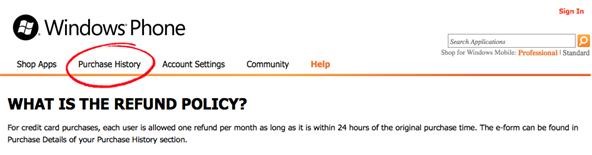
TipsThis only works on newly purchased apps about 2 weeks old. Why about? Because I can't find any documentation to support this claim, but I've tried on every app I own that's older than 2 weeks, and get automatically redirected to the iTunes support page. You're more than welcome to try getting a refund still by emailing a billing inquiry, but it might be a little harder.Apple's Customer Support is known for giving exceptions to their "All Sales Are Final" policy, which they'll state in your email response. Don't make a habit of asking for refunds—they'll catch on.Step 3 Amazon's Appstore for AndroidYou'd think that Amazon's policy for refunds would be very similar to Google's, but it's nowhere near as easy. The only thing easier about the Appstore is accidentally purchasing an app. It's more like Apple's refund policy—there are no refunds—at least, there's no writing to state so. In order to get a refund, you need to email Amazon's customer service and practically beg them.Good luck.Step 4 Windows Phone MarketplaceThe Marketplace for Windows Phone 7 seems to be indecisive about their refund policy. On a Microsoft FAQ page, last updated March 17th, it states:"For Marketplace purchases, unless otherwise provided by local law of your province/state/territory, or stated otherwise at the time of purchase, all charges are non-refundable."But in the Help page on the Windows Phone Marketplace website, it states:"For credit card purchases, each user is allowed one refund per month as long as it is within 24 hours of the original purchase time. The e-form can be found in Purchase Details of your Purchase History section."I'd trust the latter, which allows one refund per month, refundable within 24 hours of purchase. Out of all the mobile app stores, this actually seems like the best policy. It's shocking that Microsoft is the winner here.


You can just restore to stock ROM of Huawei Nexus 6P, How to unbrick Nexus 6P. The steps are pretty simple, if you follow everything properly, we can guarantee you that you will end up safely with a powerful Nexus 6P. So once you are prepared with the above stuffs, its time to find the best Custom ROM for Huawei Nexus 6P.
Restore Nexus 5 to Stock and Flash Factory Images (Win/ Mac


Safely store and share your photos, videos, files and more in the cloud. Your first 15 GB of storage are free with a Google account. Google Drive: Free Cloud Storage for Personal Use


Forum Thread: How to Use Two Instagram Accounts in One Device - (Android, 2015) 1 Replies 2 yrs ago How To: Get a Full-Res Version of Anybody's Profile Pic on Instagram How To: Use Two Different Instagram Accounts at the Same Time on Your Android Device
The secret trick to downloading full-resolution Instagram photos


A Gauss rifle is made up of at least one magnet stage, but it could have several successive magnet stages. A magnet stage is a magnet with several ball bearings touching it on one side. The first magnet stage in this project will have another ball bearing on its other side, which we will call the "starter" ball.
Chapter 1: Magnetism -- Build a Gauss Rifle magnetic linear


Swype doesn't help in predicting words, but increases the speed of typing by just swiping the letters in the keyboard and not taking away the finger, when you move from one letter to another. This can surely save your time of typing words and can increase your input speed.
5 Ways to Type Faster on Your Smartphone's Touch Keyboard


Top Gray Hat SEO Techniques to Uplift Your Website Rankings; Black Hat SEO techniques to Avoid at All Cost in 2019; Final thoughts about white hat SEO techniques in 2019. If you want to increase your search traffic, using White hat SEO techniques can really help.
White Hat SEO: The Definitive Guide (2019) - Backlinko


If you've just ditched your Android phone for a new iPhone, you're in luck, because Apple has a way to make your transition as simple as possible with their Move to iOS app for Android. To help make things even easier on you, we've outlined the process of using Move to iOS to transfer images
How to transfer everything from iPhone to Android | AndroidPIT


This video will show you how to disable the multitask and back button on any Samsung Galaxy device. Hope you enjoy please like and subscribe. Turn Your Galaxy S7 Into A Galaxy S8
Galaxy S10: Ten Features to Enable and Disable


This concludes our tutorial on how to deactivate your online status on Facebook Messenger or Facebook chat using the iPhone 6 If you have any additional questions on how Facebook and any other related applications work, leave your questions in the "Comments" section below.
How to hide my online status in Facebook - Quora


Reverse phone lookup has never been more easy. You can now identify an unknown caller using our cutting edge cell phone lookup technology. We search millions of records to find the real person or business associated with a phone number. ZLOOKUP is 100% free and entirely hassle free reverse cell phone lookup - and it actually works!
Reverse Cell Phone Number Lookup | National Cellular Directory

How to Use Apps & Play Games on Your iPhone Using Your

News: Google to Remove SMS Features from Hangouts (Update: New Version Rolling Out)

News: Google to Remove SMS Features from Hangouts (Update: New Version Rolling Out)

It's fair to say that Google's messaging services are in a bit of a heap at the moment, and to make matters worse, Hangouts is removing its SMS capacities. Hangouts version 18 is now being rolled out, but doesn't appear to incorporate any functional changes.However, the new update includes code which will inform users that "SMS is moving out of Hangouts," and suggest that they switch to a different SMS app. 9to5Google suggest that the company will flip a server-side switch in a few days removing all SMS functionality, with the exception of Google Voice.This news comes after Google had been trying to push the corporate aspect of Hangouts with the newly-launched Hangouts Meet and Hangouts Chat. We were first made aware of the impending SMS removal when a Reddit contributor shared an email sent by Google.Last year, we announced several improvements to the most popular features of Google Hangouts, such as the new video meetings experience and better group chat messaging. As part of that ongoing effort, we will be removing carrier SMS text messaging from Hangouts on Android after May 22, 2017.
— thereisonlyoneme (Reddit)On Thursday night, the G Suite administrator with the username thereisonlyoneme said they received this email, confirming that there would be "no more carrier texting from Hangouts" after May 22. However, the tech giant stated that SMS messages sent from Google Voice would remain after that date, and that Google Voice "will continue to be supported." Hangouts SMS functionality will soon be removed. The email went on to say that in-app notices would begin to appear from March 27. However, if you don't use SMS in Hangouts, you will not see said notice, as it won't apply to you. Additionally, Project Fi users, whose SMS messages are routed through Google Voice, will not be impacted by this change.Users will be prompted to choose another default messaging app already installed on their phone. If none exists, they will be directed to the Google Play store to find a new SMS messaging app. Choosing a new messaging app will not impact existing SMS messages. All messages will be accessible in the new messaging app.
— thereisonlyoneme (Reddit)The news comes only months after Google started pushing the Rich Communication Services (RCS) Universal Profile, which hopes to replace SMS with a feature-rich, iMessage-like experience.Don't Miss: RCS Advanced Messaging Is Finally Bringing Next-Gen iMessage-Style Texting to AndroidThe aim of Google's RCS Universal Profile push is to get all major players on board for a rich texting experience from any phone, which would allow you to send Hangouts-like messages from your regular phone number.To accomplish this, the tech giant bought a startup called Jibe in 2015, which was focused on the same issue. From there, they created the Universal Profile and incorporated the tech into the Android Messages app, so now, it's just a matter of getting the carriers to implement it before RCS messages will be a reality.And it looks like Google's efforts to unify mobile messaging seem to be working: AT&T, Sprint, T-Mobile, Verizon, and many international carriers are all on board with the Universal Profile already, though some are still in the process of implementing it.Don't Miss: RCS Is Finally Here... If You Have the Right App, Phone & CarrierFollow Gadget Hacks on Facebook, Twitter, Google+, and YouTube Follow Android Hacks on Facebook, Twitter, and Pinterest Follow WonderHowTo on Facebook, Twitter, Pinterest, and Google+
Cover photo and screenshots by Dallas Thomas/Gadget Hacks


Text messaging may no longer be a feature in Hangouts . SOFTPEDIA® NEWS Play Store to find a new alternative. SMS through user Google Voice numbers can still be sent started rolling out
Google updates Hangouts app to support merged SMS


News: Google to Remove SMS Features from Hangouts (Update: New Version Rolling Out) How To: Hangouts Just Got Better with VoIP Calls for Android & iOS How To: Preview New Google Hangout Messages from the Home Screen on Your Galaxy Note 3
Google Hangouts 5.0 Update Brings Performance Improvements


Google announced last week that it intends to deprecate SMS functionality in Hangouts, and now an update is rolling out which prepares users of the messaging platform to switch SMS apps. Hangouts
Google Is Reportedly Killing Hangouts Text Messaging Feature


Hangouts, and most other texting apps, use the "Bitmap.createScaledBitmap" API to produce a compatible picture MMS, but that just gives a crappy, low-quality version of the original image. Developer Kevin Mark decided to do something about the compression of MMS images and created an Xposed module to change the API used during image compression.
How to Preview New Google Hangout Messages from the Home


However, the new update includes code which will inform users that "SMS is moving out of Hangouts," and suggest that they switch to a different SMS app. 9to5Google suggest that the company will flip a server-side switch in a few days removing all SMS functionality, with the exception of Google Voice.
Hangout on Your Mobile Phone with Google+ & More - WonderHowTo


Google updates Hangouts app to support merged SMS conversations Google has announced that the new version of the app, Hangouts 2.1, is rolling out to all users over the next few days.
Hangouts Future Update Will No Longer Have the SMS Feature


Like what iMessage is to iOS, Google Hangouts is to Android—allowing users to share messages instantly, as if quickly wasn't good enough. With Google Hangouts, you can share locations and send maps, receive and send SMS, share animated GIFs, make video calls, and chat not only with your phone's contacts, but also your Google+ and Gmail buddies.
How to Theme Hangouts for Android with 23 Custom Colors


Unfortunately, the Hangouts application doesn't have too many users at the moment and things will get worse, because the company decided to remove the SMS feature from it. Hangouts version 18 is currently rolling out, but, for now, it doesn't come with any functional changes. However, the new version of the application comes with a code
Improve Picture Quality for MMS Messages in Hangouts « HTC


Hangouts is a great cross-platform messaging service from Google that works with almost any device, making it one of the few messengers that can be installed on Mac, Windows, iOS, and Android gadgets alike. With its many useful features, one of the few debatable downsides is its not-so-attractive color scheme.

Google to Remove SMS Features from Hangouts (Update: New


Google has started rolling out the Hangouts version 5.0 to Android users. While the search giant has not provided the official changelog, reports have revealed a list of changes seen in the new
Hangouts 18 rolling out now, prepares the app to remove SMS

How To: Use Yelp Collections to Find New Places & Keep Your Bookmarked Locations More Organized

How To: Use Yelp Collections to Find New Places & Keep Your Bookmarked Locations More Organized

In the past, if you stumbled upon a Yelp listing you liked, you could bookmark it and check it out later on your profile. You can still take advantage of this feature in the mobile apps, but it's more refined now than it ever was thanks to Collections, a feature Yelp first added back in May 2018. You get more power over organizing, accessing, sharing, and discovering favorite businesses.If you've got a ton of bookmarked restaurants, bars, cafes, parks, boutiques, shopping centers, and whatever, you need to take advantage of the Collections feature to keep tabs on where you've been and where you want to go. You can even share a specific Collection you've made as a whole to someone else instead of sharing business by business.Don't Miss: How to View & Leave Tips on Yelp (& Why It's Important) These folder-like groups are also great because they serve up new, weekly personalized recommendations based off of your Yelp activity, and they also include Yelp-curated ones, all of which are also shareable. Collections are available in both the iOS and Android app versions of Yelp.
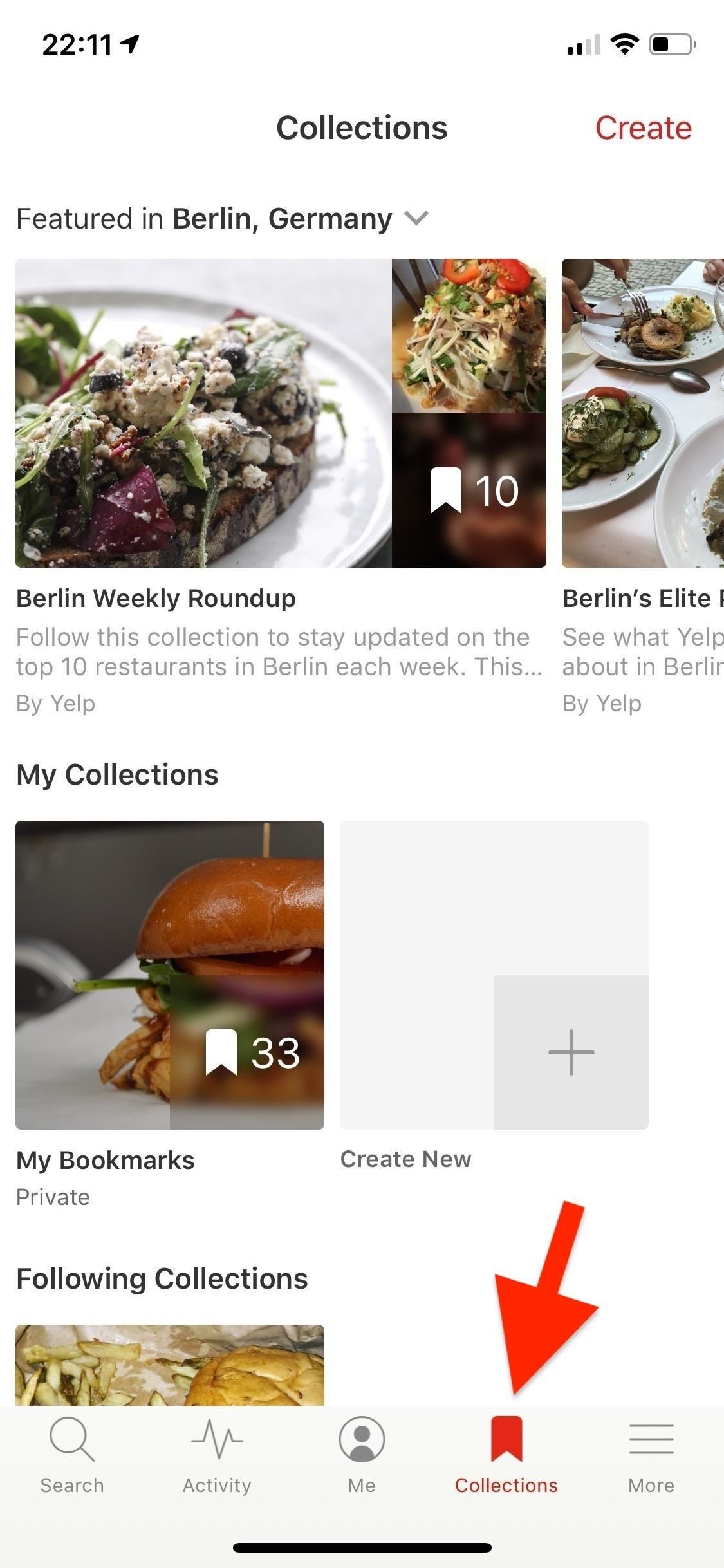
Step 1: Access & Follow CollectionsBefore we step into creating or sharing Collections, we're going to show you where they are. Open Yelp, and tap on "Collections" in the navigation bar at the bottom. Here, you can view shifting Collections featured in your city (or any city you want), your personal Collections and all your bookmarks, and Collections you follow (which is where the places recommended for you based on your activity will be). To follow a Collection, open it up, then tap on "Follow Collection." All Collections you follow will appear under the My Collections section on the page. The reason you should follow certain Collections is because they change every so often, so if you find one you really like, save it so that you have easy access to it.
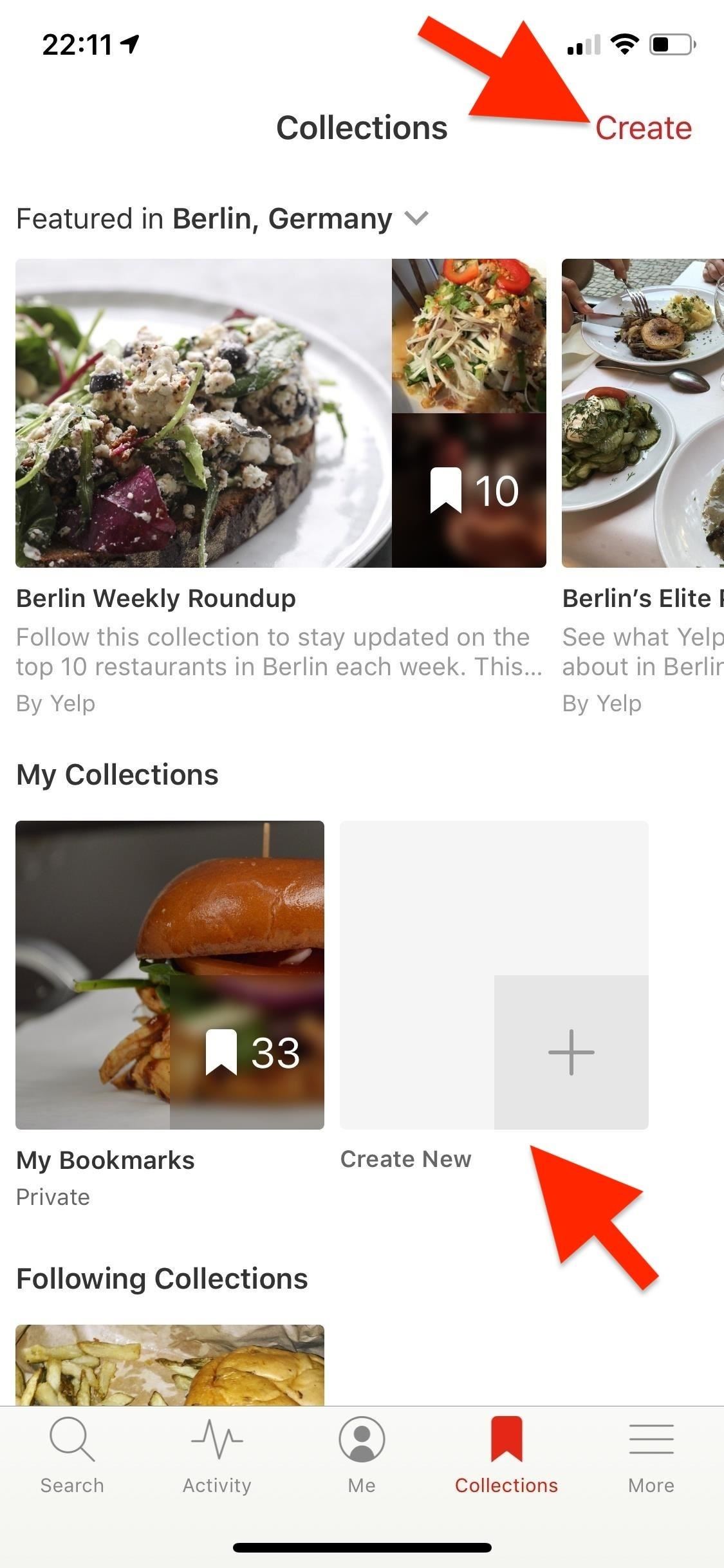
Step 2: Create Your Own CollectionInstead of simply bookmarking your favorite businesses, you can save them into a Collection of your choice, such as "Mexican Restaurants" or "Best Dive Bars in L.A." To create a Collection, either tap "Create" in the top right or tap on the "Create" (Android) or "Create New" (iOS) empty box under My Collections.Alternatively, you can create a new Collection when saving a new bookmark on a business listing. On the listing page, tap the bookmark icon, then select "New Collection." You can also tap the vertical or horizontal ellipsis (•••), aka the "More Options" button, in the top right, then select "Bookmark" (Android) or "Save Business" (iOS) to get to the "New Collection" option.Enter your Collection name, then decide whether you want it to be public or private. Only a public Collection can be featured on Yelp and viewed by others, whereas a private one is just for you. Hit "Create" (Android) or "Save" (iOS), then tap on your new Collection under the My Collections heading to view it. When viewing the collection, you get the opportunity to add a description to it.
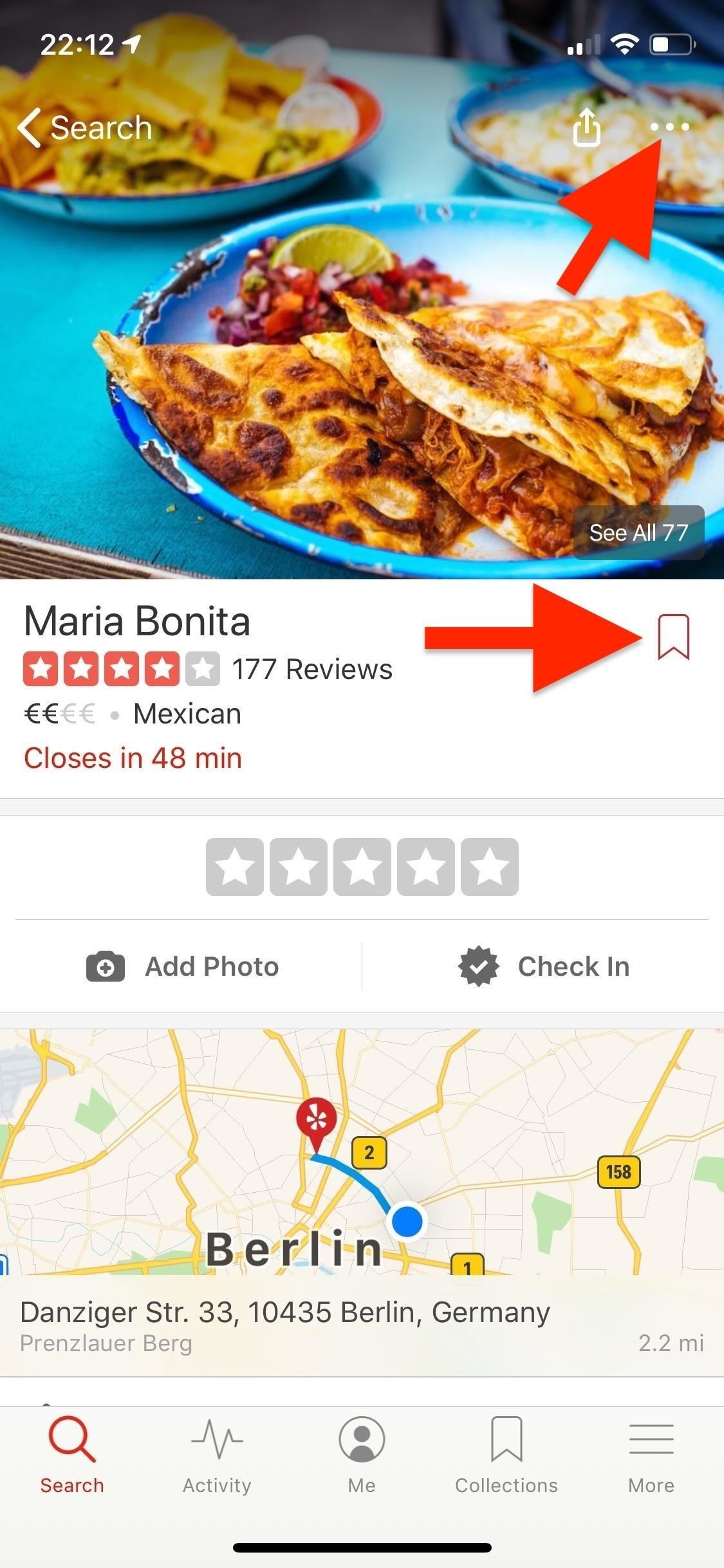
Step 3: Add to Your Personal CollectionsNow that your Collection has been created, it's time to add to it. Do this by going to a business listing and tapping on the bookmark icon. You can also tap the vertical or horizontal ellipsis (•••), aka the "More Options" button, in the top right, then select "Bookmark" (Android) or "Save Business" (iOS).You'll have the option to save the listing to "My Bookmarks," which is filled with every business you've ever bookmarked before knowing about Collections, or to any Collection you've created. Again, you can also create a new Collection from this menu. Putting a business in a custom Collection will not automatically add it to "My Bookmarks," so you'll have to do that manually if you want to keep that updated.
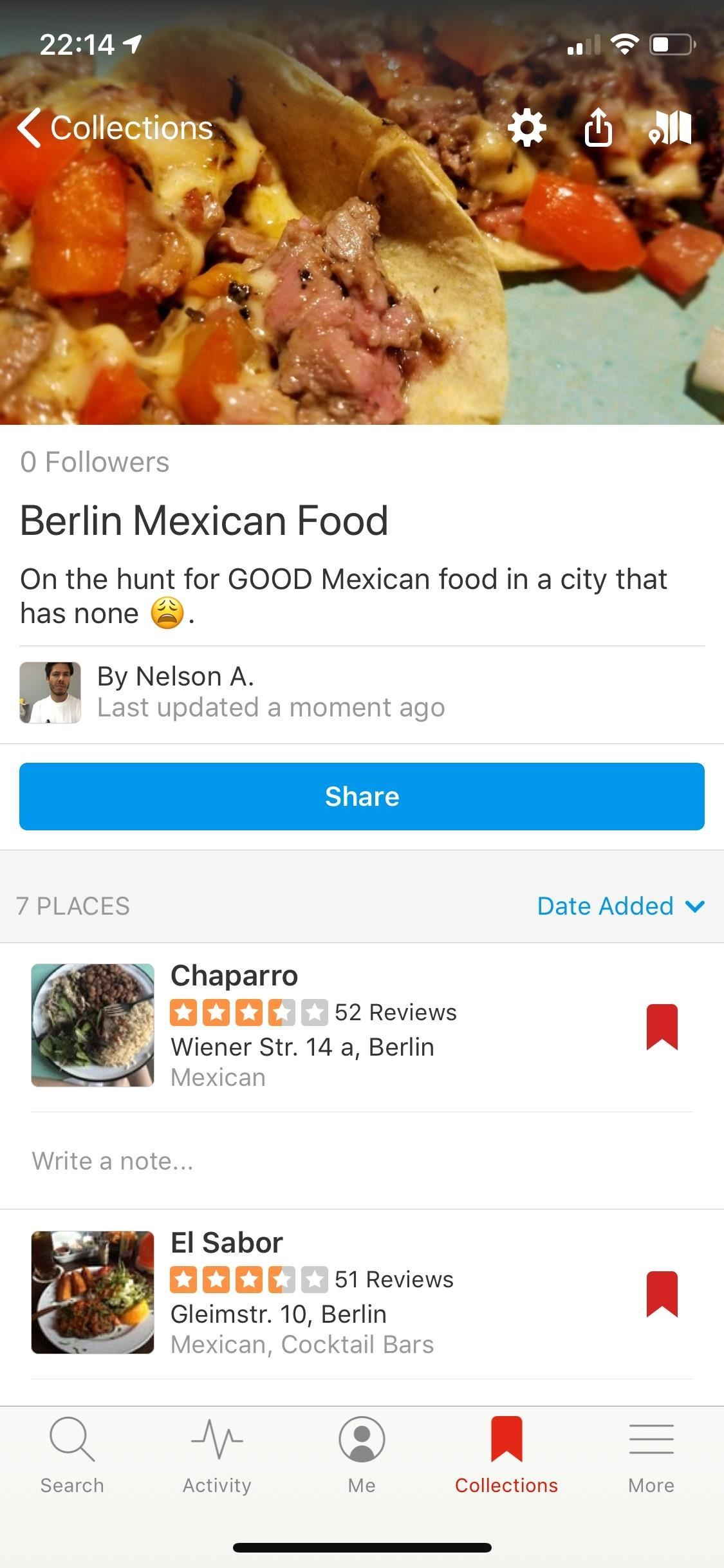
Step 4: Organize Each Collection BetterAfter you've added a few listings to your personal Collection, whenever you need it next, you'll find it right there in the "Collections" tab. When viewing a Collection, you can organize its contents by date added, by distance, or alphabetically. You can also leave notes underneath each listing: just tap on the space that says "Write a note," enter your note, and hit "Save."
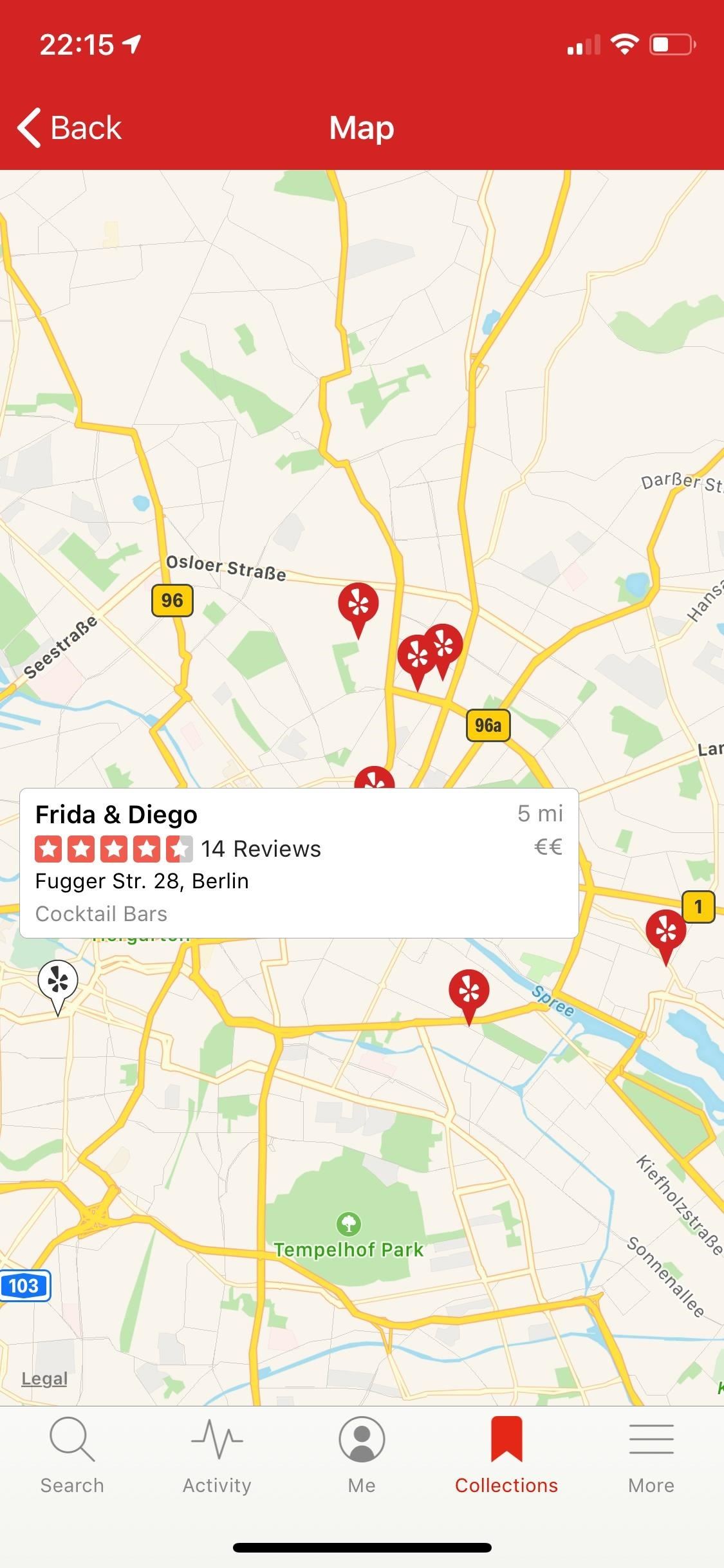
Step 5: View a Map & Edit a Collection's DetailsIf you tap on the map icon on the top right, you can view a map of your listings. To edit a Collection on an iPhone, tap the cog in the top right, which gives you access to change the name, to make it public or private, or to delete it. On Android, just tap the name on the Collection to edit that. For the other settings, tap the vertical ellipsis in the top right, then choose either "Privacy Settings" or "Remove Collection."
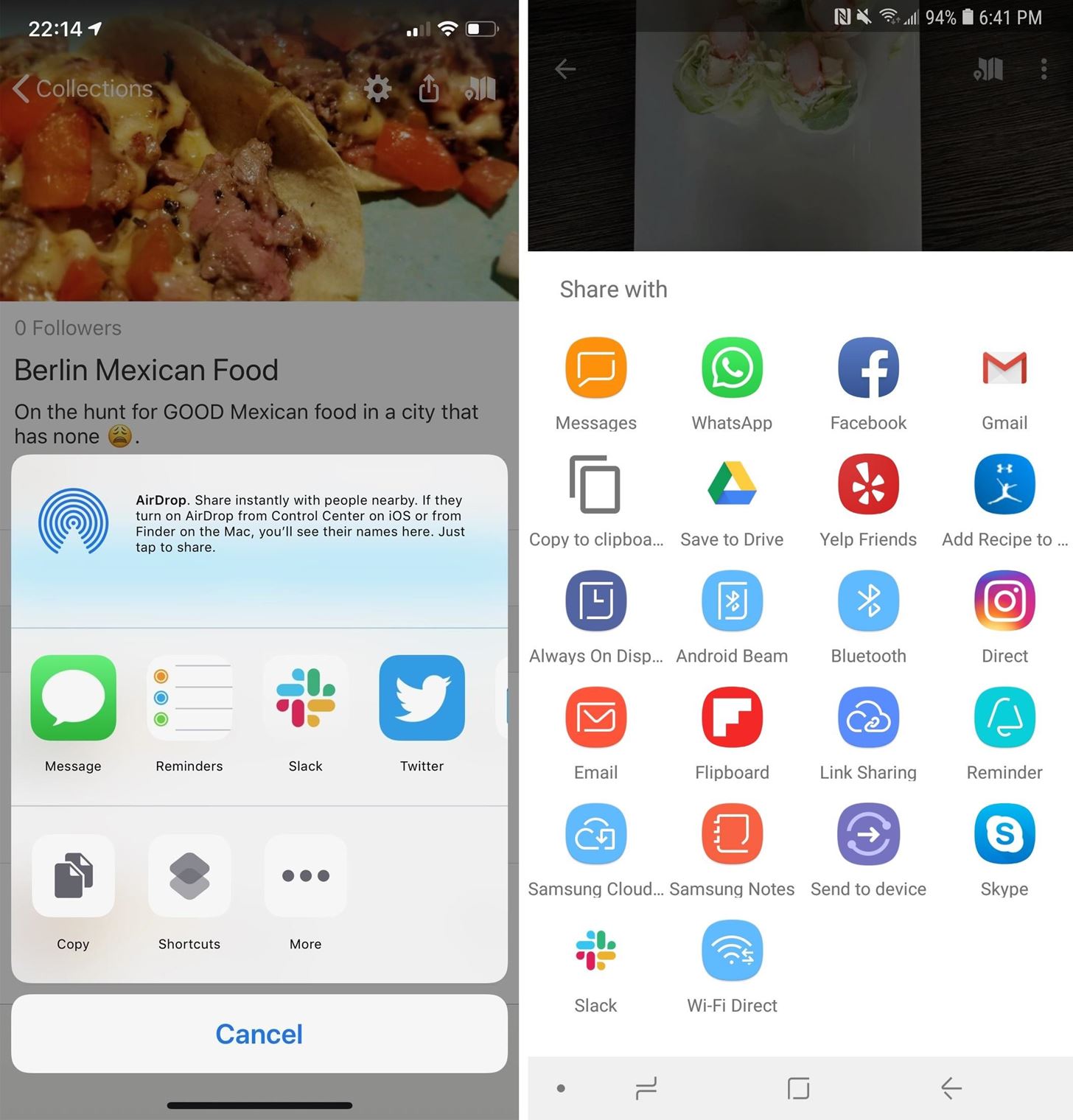
Step 6: Share a Collection with FriendsYou can use the share icon in the top right (on iOS) or the big blue "Share" button underneath the Collection name (on Android) to share your Collection via text message, social media, or whatever. You can also copy a link to the Collection and share it that way. The iOS sharing options (left) vs. Android (right). This article was produced during Gadget Hacks' special coverage on traveling with your smartphone. Check out the whole Travel series.Don't Miss: Report to Yelp Wrong Hours, Addresses, Numbers & Other Incorrect Business Listing InformationFollow Gadget Hacks on Pinterest, Reddit, Twitter, YouTube, and Flipboard Sign up for Gadget Hacks' daily newsletter or weekly Android and iOS updates Follow WonderHowTo on Facebook, Twitter, Pinterest, and Flipboard
Cover photo and screenshots by Nelson Aguilar/Gadget Hacks


At the top of your Opera window, near the web address, you should see a gray location pin.Click it. In the window that pops up, click Clear This Setting; You're good to go! Reload this Yelp page and try your search agai
wikiHow - How to do anything

Yahoo


How To: Use Yelp Collections to Find New Places & Keep Your Bookmarked Locations More Organized How To: Combine Top News Stories Shared by Facebook & Twitter Friends into One Easy-to-Read Place How To: Easily See Passwords for Wi-Fi Networks You've Connected Your Android Device To
Nelson Aguilar's Profile « Wonder How To


How To: Use Yelp Collections to Find New Places & Keep Your Bookmarked Locations More Organized How To: Report to Yelp Wrong Hours, Addresses, Numbers & Other Incorrect Business Listing Information How To: View & Leave Tips on Yelp (& Why It's Important) How To: Get Your Lost Item Back from an Uber Driver (& What to Do if They Don't Respond)
How to Create & Access Location Bookmarks on Your Galaxy Note


Learn how to do anything with wikiHow, the world's most popular how-to website. Easy, step-by-step, illustrated instructions for everything.
eBay - Electronics, Cars, Fashion, Collectibles, Coupons and More


News, email and search are just the beginning. Discover more every day. Find your yodel.
Use Yelp Collections to Find New Places & Keep Your


Click Show more, then make sure only the box labeled Location permissions is checked. Click Clear. You're good to go! Refresh this Yelp page and try your search again. You can also search near a city, place, or address instead.
Amp Event Professionals - Lake Zurich, IL - yelp.com


How To: Use Yelp Collections to Find New Places & Keep Your Bookmarked Locations More Organized How To: Enable One-Tap Page Scrolling in Either Direction on Your Samsung Galaxy Note 3 How To: Get the Hunger Games Movies for Free on Sasmsung Galaxy Devices
Restaurants, Dentists, Bars, Beauty Salons, Doctors - Yelp


Take a trip into an upgraded, more organized inbox with Yahoo Mail. Login and start exploring all the free, organizational tools for your email. Check out new themes, send GIFs, find every photo you've ever sent or received, and search your account faster than ever.
Creating Lists and Sharing with Specific friends « FarmVille


Buy and sell electronics, cars, fashion apparel, collectibles, sporting goods, digital cameras, baby items, coupons, and everything else on eBay, the world's online marketplace


In the past, if you stumbled upon a Yelp listing you liked, you could bookmark it and check it out later on your profile. You can still take advantage of this feature in the mobile apps, but it's more refined now than it ever was thanks to Collections, a feature Yelp first added back in May 2018.
yahoo mail is going places, come with us.